Creating a Window
Multiplayer is what I'm most excited about for this project, at the moment. I'm still forming my own mental model of it, so I'm looking forward to having a fresh go at implementing it.
Opening up a window and coloring in pixels is always fun though, so I'll start there. This post will establish the main game loop, set up a window, and draw a square.
Before all that, as promised in the previous post, I made a fresh repository on GitLab and filled it with a few initial files:
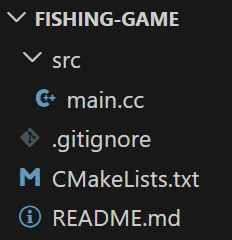
I'm not sure I'll maintain this level of detail in every post, but to get warmed up, let's take a look at each file individually to make sure we understand their purpose. After all, files are our friends! The least we could do is spend a moment getting to know them.
README.md: This contains documentation for the repository. The .md file extension stands for Markdown. It's a simple markup language for writing formatted text. HTML, but easier on the eyes. Mine will likely be empty for a long time/forever.
.gitignore: This is a special file that allows you to tell git to ignore specific files or directories in your project. Local config files or build artifacts, for example, that you don't want pushed to the repository. Get it? Git-ignore.
CMakeLists.txt: The main configuration file for CMake, which "is a tool to manage building of source code." It generates build files! It can also help manage dependencies, and other things I'm sure.
cmake_minimum_required(VERSION 4.0)
project(game)
set(CMAKE_CXX_STANDARD 20)
add_executable(game src/main.cc)
src/main.cc: The application entry point!
#include <cstdio>
#include <cstdlib>

int main(int argc, char* argv[])
{
    std::printf("Game!\n");
    return EXIT_SUCCESS;
}
Graphics and Things
To make a game you need to interact with the outside world. To interact with the outside world you need to communicate with hardware, and to communicate with hardware you need an Operating System (unless you're writing an embedded application on a microcontroller).
What pieces of hardware do we need for a game?
- A thing to capture input from a player - a keyboard, mouse, or game controller.
- A thing to help us execute graphics operations since they can be very expensive - a GPU.
- A thing to display our beautiful images - a screen.
Input and Window management are typically handled by a Window Management API. Every operating system has its own flavor.
Graphics are similar, though with a bit more cross platform madness thanks to the magic of standards bodies. OpenGL, Vulkan, DirectX, Metal are the main APIs (afaik). Game consoles also typically have custom APIs, though I believe they often support the open standards: OpenGL and Vulkan (probably not OpenGL so much anymore on newer hardware).
Vulkan is the most modern and widely supported. OpenGL is on its way out and not particularly fun for me anymore. And I don't know DirectX and don't have much incentive to learn it right now. So eventually, I expect to implement my graphics module with Vulkan.
To get things up and running for now though, I'm going to use a single Open Source library called SDL to handle all of this for me. I need to figure out what this game is even going to be before I start defining its rendering requirements.
Let's add SDL to the project! CMake's FetchContent module can help. It'll download the source code from the library's git repository and build it as part of the project. Here are some new lines for the CMakeLists.txt file that will create an executable target called game with a single source file that links against the SDL library:
cmake_minimum_required(VERSION 4.0)
project(game)
set(CMAKE_CXX_STANDARD 20)

include(FetchContent)
FetchContent_Declare(
    SDL3
    GIT_REPOSITORY https://github.com/libsdl-org/SDL.git
    GIT_TAG main
    GIT_SHALLOW TRUE
)
FetchContent_MakeAvailable(SDL3)

add_executable(game src/main.cc)
target_link_libraries(game PRIVATE SDL3::SDL3)
Now we can jump over to the main.cc file and write some code to create a window and draw a square. First, SDL needs to be initialized. Then we ask it for a window and a renderer. The window should be self-explanatory. It's a window. We give it a name, a width, a height, and some feature flags (none for now). The renderer is a black box we can use to execute draw calls.
#include <SDL3/SDL.h>
#include <SDL3/SDL_main.h>

int main(int argc, char *argv[])
{
    SDL_Init(SDL_INIT_VIDEO);

    SDL_Window *window = SDL_CreateWindow("Fishing Game", 1280, 720, 0);
    SDL_Renderer *renderer = SDL_CreateRenderer(window, nullptr);
The next thing I want to do is define an offscreen render target. This will ensure the size of the window isn't tightly coupled to the resolution of the game (though they will share the same aspect ratio). To do that I'll create an SDL texture with the target access flag so that we can draw on it.
Since I know this game will have a pixel art style, I'm going to go ahead and specify the texture's scale mode as nearest neighbor to avoid any blurring when it's scaled up to fit the window.
    SDL_Texture *target = SDL_CreateTexture(
        renderer, SDL_PIXELFORMAT_RGBA8888, SDL_TEXTUREACCESS_TARGET, 256, 144);
    SDL_SetTextureScaleMode(target, SDL_SCALEMODE_NEAREST);
Now for the main loop!
    bool running = true;
    while (running)
    {
        /*
         * 1) Poll input from the player.
         */

        /*
         * 2) Execute a step of the game simulation.
         */

        /*
         * 3) Render the state of the simulated world to the screen.
         */
    }
Every iteration of this loop represents a single frame of the game. No matter how complex the game gets, always remember the core structure of this loop:
- Gather input.
- Do something with that input.
- Draw the output.
I'll use an SDL function to iterate through the queue of pending events. For now I just want to be able to cleanly exit the game when the player clicks the close button on the window, so I'll check for the quit event and set the running flag to false when I see it.
        /*
         * 1) Poll input from the player.
         */
        SDL_Event event;
        while (SDL_PollEvent(&event))
        {
            if (event.type == SDL_EVENT_QUIT)
            {
                running = false;
            }
        }
Since there's no game state or simulation to run yet, I'll skip step 2 and go straight to rendering. The third step could arguably be broken down into two steps: rendering the game state, and then presenting the rendered image to the screen. Let's just keep it simple for now and roll it all into one step.
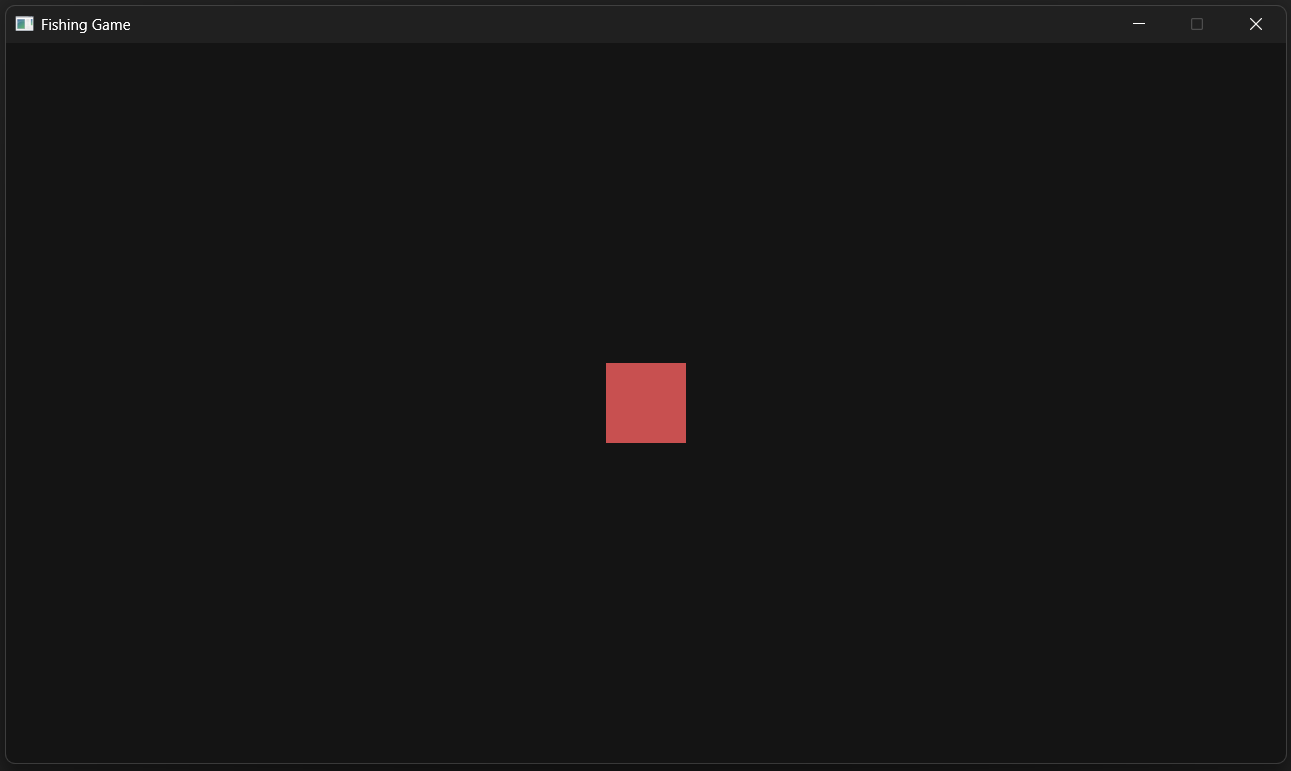
First, I tell the renderer to draw to the offscreen texture instead of the window. Then I clear the texture to a dark gray color and draw a red square in the middle of it that's 16 pixels wide and 16 pixels tall.
        /*
         * 3) Render the state of the simulated world to the screen.
         */
        SDL_SetRenderTarget(renderer, target);
        SDL_SetRenderDrawColor(renderer, 20, 20, 20, 255);
        SDL_RenderClear(renderer);

        const SDL_FRect quad{
            .x = (256 - 16) / 2.0f,
            .y = (144 - 16) / 2.0f,
            .w = 16,
            .h = 16
        };
        SDL_SetRenderDrawColor(renderer, 200, 80, 80, 255);
        SDL_RenderFillRect(renderer, &quad);
You can't see it, but there is now a red square drawn to the offscreen texture. To get it onscreen, we need to tell the renderer to draw the texture to the window and then present the rendered image to the screen, which we can do with this last set of SDL calls:
        SDL_SetRenderTarget(renderer, nullptr);
        SDL_SetRenderDrawColor(renderer, 0, 0, 0, 255);
        SDL_RenderClear(renderer);
        SDL_RenderTexture(renderer, target, nullptr, nullptr);
        SDL_RenderPresent(renderer);
    }
The last thing to mention is cleanup. We need to free the resources allocated for the window, renderer, and texture, and shut down SDL itself, before exiting the program. This is mostly boilerplate, but it looks something like this:
    SDL_DestroyTexture(target);
    SDL_DestroyRenderer(renderer);
    SDL_DestroyWindow(window);
    SDL_Quit();
    return 0;
}
Here's the full main.cc if you'd like to follow along.